lobam_laut: plszzzzz HELP me
didit168: tumben..
didit168: apa sich segitu plszzz nya..
lobam_laut: ada salah satu bozz besar yg kompinya jd aneh tiba2 IEnya gak bisa save picture sebagai JPEG, cuma bisa sebagai bmp...
lobam_laut: ada solusi gak fren gimana caranya munculkan JPEG di save as type nya ...disana yg ada cuma BMP, si bozz gak mau kayak gitu
lobam_laut: mana bawel betul tuch baozzz
didit168: di server ga di Block untuk Download .jpg ..oke sebentar gue lihat..itu masalah settingnya..
lobam_laut: kompi yg lain bisa frenn
lobam_laut: whatever the PORTAL, jika loe mo save picture nya pasti cuma bisa jd BMP ......gak ada pilihan JPEG disana ...kemaren gue dah tanya azhar tapi dia gak ada solusi juga ...
didit168: 1. dia save as nya dari halaman web or ...2. kadang kalau dari web ada yg protect ..3. coba dulu page lain..
didit168: gue baru coba save as logo google cuma ada *.gif sama *.bmp ..
lobam_laut: save dari halaman web ato lainnya sama ajah
didit168: sebelumnya bisa..
lobam_laut: logo google emang aslinya BMP...., maksud gue klo tuch picture aslinya JPEG dia maunya bisa di save sebagai JPEG juga
lobam_laut: sebelumnya bisa...
didit168: pren..jgn2..tuch file nya emang bukan jpg..soale gue dah coba save as image dari mywebs disitu ada beberapa gbr tergantung ext nya..dan yg ext emang jpg pas di save as ya ada option .jpg nya..
didit168: so depend on original filenya..
lobam_laut: filenya pasti JPEG dong klo bukan ngapain gue tanya ama loe dodol
lobam_laut: susah yee nyambung ama loe ...lambat ....
didit168: yee. sapa tahu loe yang o'on .:D
lobam_laut: gimana nich ada solusi gak..., bozz gue dah bawel kagi tuch...
didit168: 10 minute..
lobam_laut: kelamaan mikir loe... kena fuch dech gue ....
didit168: pren loe delete temporary internet filesnya..
lobam_laut: mana solusinya dodol ....?
lobam_laut: trus....
lobam_laut: tp apa hubungannya ?
didit168: itu dodol..Tools/Internet Options/delete Files Button dasar amatir loe..
didit168: kalau ga bisa juga..
didit168: coba ini..
didit168: 1. click Tools/Options .2 Click Advanced Tabs 3. di security section di bawah loe uncheck Don't save encrypted pages to disk..
didit168: sempga loe ga di Fuck..sama ur Boss :P
lobam_laut: apaan yg coba ini ...? >:P
lobam_laut: itu mach udah gue coba... tetap ajah gak bisa ......
didit168: pertama loe coba solusi 1 delete temporary dodoll kalau ga bisa pake cara 2.. >:)
didit168: yang kedua dah dicoba belum..jgn lupa abis itu close baru open lagi..kalau perlu restart tuch PC :P
lobam_laut: loe telat juga yeee, kan dah gue bilang, cara2 aATIRAN SEMUA DAH GUE COBA ampe install ulang segala
didit168: yang setting di securitynya dah di uncheck..?
lobam_laut: okeh frenn dah bizaaa , BIG THANKS FOR U
lobam_laut: :-P :"> :)) =))
didit168: ;) gaya loe kaya Bosss marah2 tapi sambil jalanin solusi/ide orang....
didit168: that analys and programmer style..
lobam_laut: dari mana loe tau klo itu ada masalah ama temporary file ? jelas kan dengan analisa sebagai seorang engineer IT
lobam_laut: jgn sok ?
didit168: alah nanya..apa mau minta ilmu loe..jgn malu..
lobam_laut: gue aneh ajah ama pernyataan LOE "dildo: that analys and programmer style.."
lobam_laut: can you tell me what do u mean ?
lobam_laut: minta ilmu bukan bukan tupe seorang engineer, tp klo sharing baru itu bener
didit168: what ever loe said.. lah..
didit168: :D peace..maksute kadang gue lebih pintar dan orang butuh share dengan yg lain ..gitu loh Bozz..
lobam_laut: klo menurut gue loe gak lebih pinter dari yg lain tuch... cuma kebetulan loe tau duluan ato loe pas lagi inget dan yg lainnya lupa .......B-)
lobam_laut: baru ilmu segitu ajah dah sok ........
didit168: perasaan Gue yg sok dan paling sok ya Loe.. :P
didit168: udah nanya pake ngomelin lagi..
didit168: sape loe...muke loe jauh deket gue garuk loe..
lobam_laut: =)) =)) =)) =))
lobam_laut: baru gue pancing segitu ajah dah sewot loe dodol
didit168: loe..kaya dah jadi Boss gue ajah..
didit168: X-(
lobam_laut: :))
lobam_laut: =)) :D :)) =)) =)) =)) L-)
didit168: Mikir Kir..Bukan Ngakak situ enak..ga diomelin boss sini tersiksa di Al Aqatraz..
didit168: :((
lobam_laut: apaan tuch "di Al Aqatraz.."
lobam_laut: sejenis kue yaaa ?
lobam_laut: mau dongggg .............
didit168: loe tuch yach..please dech..knowledge database loe jgn cuma IT aja..
lobam_laut: klo amang kue kan gak perlu mikir kir
didit168: sabar..sabar..tunggu aku Di Batam :/:)
lobam_laut: berarti "Al Aqatraz.." itu semacam database yee ?
lobam_laut: jd harus di bahas dibatam segala
lobam_laut: wah tak payah lah bahas ke batam
lobam_laut: gue dah biza bikin kok
didit168: Zizi...kualat loe mainin Orang Tua..
lobam_laut: maksudnya mainin? siapa yg orang tua ?
lobam_laut: bukannya kite gak beda jauh
lobam_laut: wah2 loe baru segitu ajah dah esmosi
lobam_laut: gimana mo ngurus anak... itu butuh kesabaran yg super tinggi
didit168: he..he..ya bedalah gue dah punya Zia, Zia belum punya Zia kecil .. :P
didit168: >:D<
lobam_laut: anak loe nama nya siapa ? kayaknya pembahasan ini belum kelar ?
lobam_laut: pertanyaan gue td kok gak di jawab
didit168: apaan..nyang manalagi cayang..
lobam_laut: jdny siapa nama anak loe ?
lobam_laut: kok gue blom dapet confirmasi
didit168: gue berpikir lihat dulu caused what the fuck problem ..
didit168: Nama anak gue..xxx Danish Permana Tera 3 Huruf pertama ga perlu jelas kan ?? :D
lobam_laut: apa yg menjadi "the fuck problem"
lobam_laut: Loe kok ngasih nama panjang betul kayak jln kereta api ajah pake gak ada putusnya
lobam_laut: pesan orang tua jaman dulu sich, klo ngasih nama asal singkat padat bermakna dan jadi doa
didit168: sorry gue maksud cara Gue solving Masalah It gue cari dulu penyebabya, kronologisnya baru kasih Obat or Solusinya..
didit168: :D namanya singkat kan.. dan itu ada artinya
didit168: nyang penting Loe Doa'in juga yach Plzzzz..
lobam_laut: mendoakan sesama muslim itu wajib, kan text doa nya dah standard sering di baca saat sholat jumat...
didit168: whuehhh..kayanya anak masjid nich nyang lagi Ngomong..
didit168: iya Pak ustadz..
lobam_laut: apalagi cuma mendoakan anak loe, mudah2an jadi anak sholeh dunia akhirat dan gak oon kayak bapaknya
didit168: Amienn...
lobam_laut: aduch tuch bozzz pada ngajak makan..... sorry gue tinggal makan duluan yeee....maklum pejabat tingkat tinggi jd serba duluan nich
lobam_laut: :D
didit168: ZIZIiiiiiiiiiiiiiiiiii..
didit168: Bye dach..sana loe..
didit168: Gile Loe..jam egini Boss masih Gawe..
didit168: last Message diterima jam 11.27 AM Now 08.58 PM
Wednesday, December 28, 2005

Mambo MySQL Installation
Hari ini gue mo install Mambo tapi ada sedikit masalah dengan step 2 pada dengan error user name and password not correct padahal gue dah bikin pake SQL YOG Enterprise, pertama error nya feature Not Supported MY SQL lalu gue stop IIS Web Server, pakai Apache bisa nach yg kedua user and password problemnya, kebetulan gue ngerjain after lunch..and keburu sore gue Inventory IT Equipment berdua Azhar..
oke dech..nanti gue terusin..
Oh ya kalau mau gampang install Content Management system like Mambo You can use application with stand alone server for Mambo, to details this information please be patiens wait until I am finished My project :D
see u..
oke dech..nanti gue terusin..
Oh ya kalau mau gampang install Content Management system like Mambo You can use application with stand alone server for Mambo, to details this information please be patiens wait until I am finished My project :D
see u..
Thursday, December 22, 2005
SQL Express 2005
Ya gara-gara ga punya SQL Server terpaksa nyari nyang gratisan, dari Mulai Postgress, MYSQL sampe kepunyaan Oom Bil Gates, Microsoft Desktop Engine(MSDE), semalam abis install Web SQL data administarator, sebuah aplikasi yang sebetulnya bukan official dari M$ tapi lumayan buat ngatur MSDE yang karena gratisan ga ada graphical interface cuma lewat Console, cukup membantu buat develope sebuah web aplikasi dengan back end SQL Server. Kita bisa create dataabase, table, Query, manage User Role lewat browser.
Nach tadi before lunch..sempat juga download Microsoft SQL Server 2005( SQL Express), lumayan gede file installernya 53.5 MB yach untung speed di PT 512/2 so ga pegel banget nunggunya..tapi sebelumnya kita harus install M$ Framework Dot Net versi 2, baru run tuch SQL Express.Exe nya, software ini support baik untuk 32 Bit Flatform atau 64 Bit tapi harus disesuaikan framework Dot Netnya..
Lengkapnya Nanti aja kalau sempet gue bikin Tutorialnya..
Nach tadi before lunch..sempat juga download Microsoft SQL Server 2005( SQL Express), lumayan gede file installernya 53.5 MB yach untung speed di PT 512/2 so ga pegel banget nunggunya..tapi sebelumnya kita harus install M$ Framework Dot Net versi 2, baru run tuch SQL Express.Exe nya, software ini support baik untuk 32 Bit Flatform atau 64 Bit tapi harus disesuaikan framework Dot Netnya..
Lengkapnya Nanti aja kalau sempet gue bikin Tutorialnya..
Microsoft SQL Server Web Data Administrator (Part 3)
Buka Microsoft SQL Web Data Administrator (Jika belum menginstall baca ini)
1. Klik Tombol Start >All Program > Microsoft SQL Web Data Administration >SQL Web Data Administrator 2. Ketik di Browser http://localhost/webadmin (penulis mencoba di IE browser)
 Halaman LoginMode
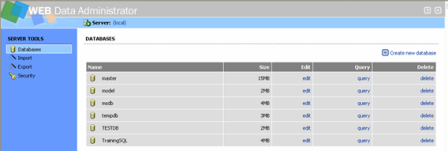
Halaman Database Klik pada gbr untuk Perbesar
Klik pada link Create New Database pada pojok kanan atas. Anda akan ditanya untuk memberikan nama pada database baru – Masukan ‘MyDB’ (tanpa tanda petik) dan klik Create Lihat Gambar
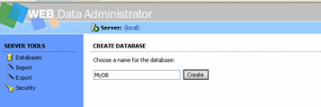
Gambar Create Database page
Setelah database dibuat, dapat dilihat tidak ada table yang ditampilkan. Maka kita buat satu buah table meggunakan Create new table link.

Ketika muncul promted untuk memasukan nama baru untuk table, pilih/ketik ‘MyLinks’ dan klik Create. Table akan terbentuk dan langsung menuju(redirected) ke halaman Edit Column kita akan melakukannya. dimana kita dapat menambah (add) kolom baru ke table, dan
Dalam Field Column Name( nama kolom) masukan ‘Title’. Biarkan untuk Data Type tetap Char, namun kita ubah Length(panjang) property jadi ‘64’ (characters). Biarkan field lainnya sementara tidak perlu diubah lalu tekan Add.

Satu Buah kolom telah dibuat, selanjutnya kita buat satu buah lagi dengan cara yang sama namun kita beri nama kolom kedua ‘URL’ dan panjang field ‘128’. Tekan submit dan kolom kedua akan terbentuk.
dari sisi kiri menu pilih Query karena kita akan menyimpan sebuah nilai.
Jalankan beberapa Query dibawah ini :
INSERT INTO MyLinks (Title, URL) VALUES ('Geekped
ia', 'http://www.geekpedia.com')
Sekarang anda masih dihalaman Query, run/jalankan Query tersebut untuk melihat pada baris yang dimasukan. Ketikan syntax berikut :
SELECT * FROM MyLinks
Klik tombol Execute


Microsoft SQL Server Web Data Administrator (Part 2)
Authentication Mode
Langkah Mengedit Authentication Mode Pada Registry Editor
Namun Jika anda membuat beberapa website dimana anda menyiapkan untuk proses upload ke sebuah web host, maka kita mungkin menyiapkan hal ini (Authentication) untuk SQL Login
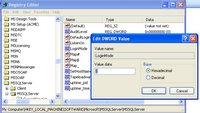
Langkah Mengedit Authentication Mode Pada Registry Editor
Memulai Regedit
- Klik Tombol Start
- Pilih Tombol Run
- Ketik Regedit lihat Gbr

Gambar Open Regedit melaui Kotak Run
Mengedit Nilai LoginMode pada Registry Editor

Gambar Edit LoginMode
Microsoft SQL Server Web Data Administrator (Part 1)
Note: Untuk Install MSDE SQL server 2000 lihat Link artikel Posting sebelumnya atau Find di kotak Search di side Box(sebelah kiri) Blog Ini bagian Cari di Blog Ini Click Tombol Find
Brief description SQL Server

SQL Server Web Data Administrator memudahkan untuk mengatur data SQL Server, dimanapun anda berada.
Over View
Menggunakan feature yang sudah built-in, anda dapat melakukan semua melalui MS Internet Explorer :P,atau browser faforit anda: padahal gue penggemar Fire F
-Create dan Edit database dalam SQL Server 2000 atau MS SQL server 2000 Desktop Engine (MSDE 2000)
-melakukan hal khusus pada Query database (Perform ad-hoc queries) dan menyimpan database tersebut ke dalam file system
-Mengatur user dan aturan-aturannya
-View, Create dan edit store procedures
Apapun yang anda lakukan pada M$ Windows atau web develoment, atau sekedar membutuhkan remote access ke data untuk anda sendiri atau client, Web Data Administrator pelengkap yang cukup sempurna sebagai toolbox anda.
Sumber : http://www.microsoft.com/downloads/details.aspx
?FamilyID=c039a798-c57a-419e-acbc-2a332cb7f959&displaylang=en
System requirements
* Supported Operating Systems: Windows 2000 Service Pack 4; Windows Server 2003; Windows XP; Windows XP Service Pack 1
Web Data Administrator requires:
* Microsoft SQL Server 7 SP2 or later
* Microsoft .NET SDK or Microsoft Visual Studio .NET
* Microsoft Internet Explorer 5.5 or later
* Microsoft Internet Information Services (IIS) -- optional, a portable web server* is also
distributed with the project
* There are two versions of the SQL Server Web Data Administrator Tool. One runs under IIS and the other runs under a Microsoft .NET shared source web server named Cassini. For more information on Cassini and source code please go to: http://asp.net/Projects/Cassini/Download/Default.aspx?tabindex=0&tabid=1.
Note: The SQL Web Data Administrator is not officially supported by Microsoft Product Support Services (PSS). If you require support for this tool, post your question in the SQL Web Data Administrator forum on the SQLJunkies site at http://www.sqljunkies.com/forums/.
Brief description SQL Server
SQL Server Web Data Administrator memudahkan untuk mengatur data SQL Server, dimanapun anda berada.
Over View
Menggunakan feature yang sudah built-in, anda dapat melakukan semua melalui MS Internet Explorer :P,atau browser faforit anda: padahal gue penggemar Fire F
-Create dan Edit database dalam SQL Server 2000 atau MS SQL server 2000 Desktop Engine (MSDE 2000)
-melakukan hal khusus pada Query database (Perform ad-hoc queries) dan menyimpan database tersebut ke dalam file system
-Mengatur user dan aturan-aturannya
-View, Create dan edit store procedures
Apapun yang anda lakukan pada M$ Windows atau web develoment, atau sekedar membutuhkan remote access ke data untuk anda sendiri atau client, Web Data Administrator pelengkap yang cukup sempurna sebagai toolbox anda.
Sumber : http://www.microsoft.com/downloads/details.aspx
?FamilyID=c039a798-c57a-419e-acbc-2a332cb7f959&displaylang=en
System requirements
* Supported Operating Systems: Windows 2000 Service Pack 4; Windows Server 2003; Windows XP; Windows XP Service Pack 1
Web Data Administrator requires:
* Microsoft SQL Server 7 SP2 or later
* Microsoft .NET SDK or Microsoft Visual Studio .NET
* Microsoft Internet Explorer 5.5 or later
* Microsoft Internet Information Services (IIS) -- optional, a portable web server* is also
distributed with the project
* There are two versions of the SQL Server Web Data Administrator Tool. One runs under IIS and the other runs under a Microsoft .NET shared source web server named Cassini. For more information on Cassini and source code please go to: http://asp.net/Projects/Cassini/Download/Default.aspx?tabindex=0&tabid=1.
Note: The SQL Web Data Administrator is not officially supported by Microsoft Product Support Services (PSS). If you require support for this tool, post your question in the SQL Web Data Administrator forum on the SQLJunkies site at http://www.sqljunkies.com/forums/.
Tuesday, December 20, 2005
RSS Artikel
RSS
Dari Wikipedia Indonesia, ensiklopedia bebas berbahasa Indonesia.
RSS adalah sebuah file berformat XML untuk sindikasi yang telah digunakan (diantaranya dan kebanyakan) situs web berita dan weblog. Singkatan ini biasanya mengarah ke beberapa protokol:
* Rich Site Summary (RSS 0.91)
* RDF Site Summary (RSS 0.9 and 1.0)
* Really Simple Syndication (RSS 2.0)
Teknologi yang dibangun dengan RSS mengijinkan kita untuk berlangganan kepada situs web yang menyediakan umpan(feed) RSS, biasanya situs web yang isinya selalu diganti secara reguler. Untuk memanfaatkan teknologi ini kitamembutuhkan layanan pengumpul. Pengumpul bisa dibayangkan sebagai kotak surat pribadi. Kita kemudian dapatmendaftar ke situs yang ingin kita tahu perubahannya. Namun, berbeda dengan langganan koran atau majalah, untuk berlangganan RSS tidak diperlukan biaya, gratis. Tapi, kita biasanya hanya mendapatkan satu baris atau sebuahpengantar dari isi situs berikut alamat terkait untuk membaca isi lengkap artikelnya.
Penggunaan
RSS digunakan secara luas oleh komunitas weblog untuk menyebar ringkasan tulisan terbaru di jurnal, kadang-kadang juga menyertakan artikel lengkap dan bahkan gambar dan suara. Sekitar 2000, penggunaan RSS meluas diberbagai penerbitan berita, termasuk Reuters, CNN, dan BBC. RSS digunakan pada hampir semua situs berita atau weblog, dengan berbagai tujuan termasuk: pemasaran, press release, laporan reguler produk, atau aktivitas lain yang membutuhkan pemberitahuan periodik dan tentunya publikasi.
Sebuah program komputer yang dikenal sebagai pembaca umpan (feed reader) bertindak sebagai pengumpul. Program ini mengecek situs yang menyediakan RSS dan menampilkan berbagai artikel baru yang ditemukan. Tenggang waktu dan siklus pengumpulan RSS biasanya dapat diatur oleh penggunanya. Program pengumpul dapat berupa program komputer atau sebuah layanan web yang tersedia online.
Program pengumpul RSS di komputer biasanya berupa aplikasi (software) sendiri yang harus dipasang di komputer sebelum dapat digunakan. Program ini tersedia untuk berbagai jenis sistem operasi dengan harga bervariasi. Ada juga program pengumpul RSS yang gratis. Lihat Daftar pengumpul RSS.
Program pengumpul di web tidak memerlukan pemasangan dan pengaturan, kita dapat melihat dan mengecek RSS kita di mana saja, asal ada browser dan koneksi internet. Beberapa layanan pengumpul RSS juga menyediakan penggabungan dan juga pencarian.
Sebuah web yang menyediakan umpan RSS biasanya ada link dengan sebuah tombol bertuliskan atau
atau  . Namun disarankan menggunakan RSS daripada XML agar tidak membuat kerancuan (sebab setiap RSS adalah XML, tapi tidak tiap XML itu RSS).
Seperti ditulis di atas, ada beberapa versi RSS, dan bahkan ada kelompok membuat format baru Atom yang juga telah diadopsi oleh banyak situs. Tapi pemakai RSS tidak perlu bingung, para pembuat program pengumpul sindikasi biasanya bisa mengenali kedua format tersebut, bahkan masih menyediakan pembaca untuk format yang lama.
Dari Wikipedia Indonesia, ensiklopedia bebas berbahasa Indonesia.
RSS adalah sebuah file berformat XML untuk sindikasi yang telah digunakan (diantaranya dan kebanyakan) situs web berita dan weblog. Singkatan ini biasanya mengarah ke beberapa protokol:
* Rich Site Summary (RSS 0.91)
* RDF Site Summary (RSS 0.9 and 1.0)
* Really Simple Syndication (RSS 2.0)
Teknologi yang dibangun dengan RSS mengijinkan kita untuk berlangganan kepada situs web yang menyediakan umpan(feed) RSS, biasanya situs web yang isinya selalu diganti secara reguler. Untuk memanfaatkan teknologi ini kitamembutuhkan layanan pengumpul. Pengumpul bisa dibayangkan sebagai kotak surat pribadi. Kita kemudian dapatmendaftar ke situs yang ingin kita tahu perubahannya. Namun, berbeda dengan langganan koran atau majalah, untuk berlangganan RSS tidak diperlukan biaya, gratis. Tapi, kita biasanya hanya mendapatkan satu baris atau sebuahpengantar dari isi situs berikut alamat terkait untuk membaca isi lengkap artikelnya.
Penggunaan
RSS digunakan secara luas oleh komunitas weblog untuk menyebar ringkasan tulisan terbaru di jurnal, kadang-kadang juga menyertakan artikel lengkap dan bahkan gambar dan suara. Sekitar 2000, penggunaan RSS meluas diberbagai penerbitan berita, termasuk Reuters, CNN, dan BBC. RSS digunakan pada hampir semua situs berita atau weblog, dengan berbagai tujuan termasuk: pemasaran, press release, laporan reguler produk, atau aktivitas lain yang membutuhkan pemberitahuan periodik dan tentunya publikasi.
Sebuah program komputer yang dikenal sebagai pembaca umpan (feed reader) bertindak sebagai pengumpul. Program ini mengecek situs yang menyediakan RSS dan menampilkan berbagai artikel baru yang ditemukan. Tenggang waktu dan siklus pengumpulan RSS biasanya dapat diatur oleh penggunanya. Program pengumpul dapat berupa program komputer atau sebuah layanan web yang tersedia online.
Program pengumpul RSS di komputer biasanya berupa aplikasi (software) sendiri yang harus dipasang di komputer sebelum dapat digunakan. Program ini tersedia untuk berbagai jenis sistem operasi dengan harga bervariasi. Ada juga program pengumpul RSS yang gratis. Lihat Daftar pengumpul RSS.
Program pengumpul di web tidak memerlukan pemasangan dan pengaturan, kita dapat melihat dan mengecek RSS kita di mana saja, asal ada browser dan koneksi internet. Beberapa layanan pengumpul RSS juga menyediakan penggabungan dan juga pencarian.
Sebuah web yang menyediakan umpan RSS biasanya ada link dengan sebuah tombol bertuliskan
 atau
atau  . Namun disarankan menggunakan RSS daripada XML agar tidak membuat kerancuan (sebab setiap RSS adalah XML, tapi tidak tiap XML itu RSS).
Seperti ditulis di atas, ada beberapa versi RSS, dan bahkan ada kelompok membuat format baru Atom yang juga telah diadopsi oleh banyak situs. Tapi pemakai RSS tidak perlu bingung, para pembuat program pengumpul sindikasi biasanya bisa mengenali kedua format tersebut, bahkan masih menyediakan pembaca untuk format yang lama.
Enaknya Pakai RSS Reader

Emang enak pake rss reader, baca berita dari Media Indonedia gak perlu masuk web sitenya ada versi cetak dan aktualnya dan header2 berita nya selalu update, pake RSS reader gak jauh beda dengan layout email program..
Mau Coba ikutin aja posting sebelum dan sesudah ini..
sample click my feed site di side Box dan paste ke RSS Reader atau progema sejenisnya..
Monday, December 19, 2005
About RSS Reader XML Format
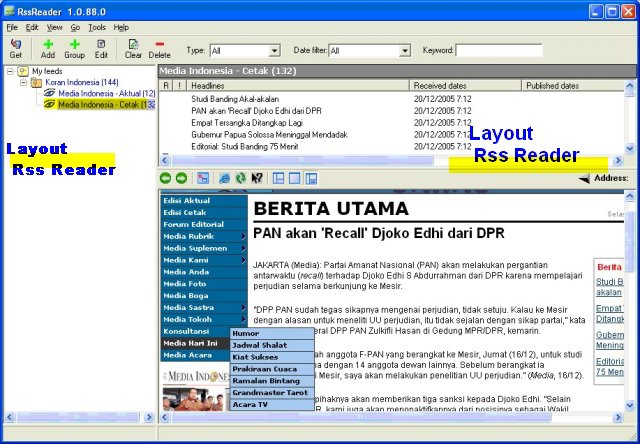
RSS adalah sebuah file berformat xml untuk sindikasi kebanyakan digunakan web site berita, seperti Kompas, Media Indonesia (ada versi Aktual dan Cetaknya) dan web blog, secara sederhana dapat digambarkan penggunaan Teknologi RSS ini,Web site berita dan Blog yang menyediakan fasilitas berlangganan untuk mengumpulkan informasi yang isinya selalu di perbarahui secara reguler, dan web site maupun Blog tersebut meyediakan umpan (feed) RSS, nach untuk membaca RSS tersebut kita memerlukan sebuah feature atau layanan yang bisa dimanfaatkan teknologi ini, untuk lebih mudahnya dapat di ilustrasikan seperti kita membuka dan membaca pesan melalui program email seperti Outlook, Qmail, Send Mail sebagai layanan untuk membaca RSS tersebut. Layanan berlangganan RSS berbeda dengan langgan Koran atau majalah layanan ini Gratis, tapi kita bisa membaca header dari berita atau pengantar maupun versi lengkapnya melalui link yang disediakan. Untuk berlanggan ada dengan cara mendaftar maupun sekedar mencopy paste alamat RSS dari Web atau Blogg. Penulis menggunakan RSS reader untuk membaca layanan berita dari Media Indonesia yang dapat di download di http://www.rssreader.com/download.htm, yang harus diperhatikan jika ingin menginstall RSS reader
1. jika O/S bukan W 2003 atau Windows XP versi terbaru dan tidak pernah menginstall free Microsoft.Net Framework (Apa itu Microsoft.Net Framework ?)anda perlu menngunduh (download) dan menginstallnya.
2. Download RSS Reader
3. Install RSS Reader
4. Lihat ini
 atau
atau  dalam halaman web pada website berita atau Blogg contoh Media Indonesia Aktual , media Indonesia Cetak
Tempatkan mouse pada salah satu gambar diatas, klik kanan atau "Copy Short Cut" pada Fire Fox Klik kanan copy image Location, Buka RSS Reader Klik add(+) channel/feed dan paste link url (alamat yg di Copy sebelumnya)lalu tekan OK. Banyak Web dan Blogg yang memberikan fasilitas feed gratis untuk RSS
Selamat Mencoba.
Link Info
http://www.microsoft.com/net/basics/framework.asp (download..)
http://id.wikipedia.org/wiki/RSS (Artikel RSS dari Wikipedia)
http://www.rssreader.com/download.htm
Sunday, December 18, 2005
Cerita Buat Danish..
Cerita Buat Danish….
Batam 12 Desember 2005
Cerita Buat danish, tulisan ini buat dedeku yang dulu sering buat “glejug-glejug” , kata ini sering kita sebut ketika danish masih dalam kandungan bundanya, dia sering melakukan gerakan-gerakan dalam perut, menendang-nendang sehingga aku merasakan sensasi seperti ada mahluk kecil dalam perut yang berusaha komunikasi dengan ayah dan bundanya.
Kalau dari awal sedikit panjang cerita kelahiran anak pertamaku, sebagian sudah aku ceritakan di blogku sebuah catatan coretan online dengan alamat http://diditpermana.blogspot.com .
Kamis, 08 Dec 2005
Jam 20.31
“Ayah lg ngapain? Bunda kangen..bgt. Bw dd mkin berat neeh, nitip dong bntar ”
Isi SMS dari sayangku, aku ga tahu dia sudah mulai terasa pada perutnya, sebagai tanda awal dari proses kelahiran. Aku juga membalas beberapa sms dari sayangku, saat itu aku makan bareng bang khaibar di warung yang baru buka di Prambanan cabang dari Pujasera kita pesan Ayam Goreng dan Orange Juice…
Jum’at, 09 Dec 2005
Jam 02.31 Pagi
“Aa ad ga bs bo2, perutny sakit. Aa bilang dd dong jgn bkn bunda sakit. Dd kan anak baek” aku baca sms ini pagi hari sebelum berangkat kerja dan setelah aku telepon dia bilang ga apa-apa aku gak perlu pulang nanti sore saja, seperti biasa setiap jum’at sore aku pulang ke Batam.
Hari itu cuaca sedikit gerimis, sampai PT aku baca email-email yg masuk di Gmail, karena masih jam 7 kurang beberapa menit, jam kerja dimulai Jam 7,tidak beberapa lama Hp ku berdering ternyata telepon dari rumah bahwa dia merasakan perutnya sakit dan aku diminta untuk pulang ke Batam segera karena sayangku sudah mengeluarkan darah dan itu tanda seorang ibu akan segera melahirkan. Aku bilang ke Azhar temanku yang posisi mejanya berada di belakang ku, “pren gue harus Pulang ke Batam, istri gue ngeluarin darah” saat itu evi yang berada meter diseberangku dari mejanya seperti mendengar kekhawatiranku, aku segera minta advise ke May bagian HR, aku kemukakan alasan kebatam dan kejadian yang dialami istriku, entah apa dia tidak mengerti atau memang style dia saat aku bilang istriku mengalami pendarahan dan aku harus segera pulang ke Batam dia dengan…. Menanyakan “istrimu pendarahan karena apa” melahirkan atau hal lain aku jawab “ya aku bicara pendarahan konteks nya ya karena istriku sedang hamil” ga mungkin luka karena pisau atau hal lain yang tidak perlu aku sampaikan ke HR, akhirnya aku tanya evi kemana Mba Rini saat itu dia belum datang.., aku segera mengambil Leave form, dan setelah minta saran mba dewi di pantry karena sedikit bingung dengan reason nya soalnya sesuai aturan hanya dapat dua hari jika istri melahirkan, akhirnya aku tulis “giving birth process’ dan leave from 09-12-05 until 09-12-05. Oh ya azhar juga sebetulnya mengambil cuti hari senin untuk mengurus SIM ke Tg Pinang, lumayan seru juga pas hari rabu atau kamis saat mba rini memastikan salah satu dari kami harus stand by di PT, terasa juga kehadiran IT person di PT….
Diluar mulai turun hujan, aku bicara sebentar dengan Azhar dan meminjam motor shogun 125 cc merahnya untuk ke dorm 3.8 mengambil tas dan sebagian pakaian, dari pos security Bu Lina menanyakan keperluan ku sambil bergurau ketika aku akan melewati gerbang PT, setelah kembali dari dorm aku kembali ke PT mengembalikan kunci motor ke Azhar dan dia melihat dari depan pintu masuk office…
7.49 AM
Aku sampai di Pelantar yang terdiri dari papan seperti sebuah dermaga kecil untuk pemberhentian dan berangkat speed di Lobam, setelah membeli tiket speed tujuan batam seharga 28.000 rupiah di tempat tiket yang berada disamping pos Angkatan Laut didepan pangkalan ojek, aku menunggu speed yang datang dari arah Tg Pinang, karena speed itu berhenti di Lobam, sebelum ke batam. Aku menunggu di warung yang menyatu dengan pelantar, warung itu menjual Baso dan makanan serta minuman sering dijadikan tempat menunggu kedatangan speed bagi orang yang akan ke Batam maupun Tg pinang.., disitu aku menunggu sambil membaca Novel yang ditulis Agatha Christie “The Man In Brown Suite” sebuah novel fiksi jenis Thriller yang bersetting cerita sekitar sebelum dan sesudah PD II.., saat itu aku sedikit cemas karena speed belum datang juga, ditambah cuaca di Laut yang memburuk ombak pasang ditambah kabut yang menyebabkan tidak mungkin speed mengambil resiko untuk jalan, sambil menunggu karena suntuk aku ngobrol dengan penumpang duduk disampingku dia dari melayu dan asli dari Lobam dengan tujuan mengobati ibunya yang terkena sakit kuning, dia bercerita banyak tentang dirinya juga beberapa orang yang dikenalnya di AMC tempat ku kerja, dia pernah kerja di PT Swarm elect nama sebelum AMC, aku hanya sebagai pendengar ketika dia menceritakan beberapa orang yang masih dia kenal yang aku ingat cerita tentang Bang Umar, yang sekarang jadi Assisten Manager Engineering dia menceritakan saat dulu bang umar masih menjadi technisi, dia juga menyebut keke tan yang menjabat manager orang yang tidak aku kenal tapi pernah diceritakan kadek temanku yang pernah masuk ketika masih bernama PT Swarm tetapi hanya beberapa hari dan beberapa tahun kemudia dia kembali masuk ketika berubah menjadi AMC dengan posisi Senior enggineer di IQA..he…he nich orang banyak storynya..,…
Sambil memandang laut aku bertanya.tanya bagaimana keadaan istriku sekarang.., Laut Lobam yang pasang dan hujan yang berkabut membuat pikiran ku sedikit resah..
09-12-2005
08:57 AM
“aa dah smp mana? Ad di yahya, dah bukaan 4 n ga bleh pulang” aku dapat sms dari sayangku, ternyata dia sudah di yahya medica centre sebuah klinik dekat rumahku didepan pasar sagulung, memang istriku ingin melahirkan disitu disamping dekat juga pelayanannya bagus. Aku hanya bisa menunggu datangnya speed ditemani star mild karena saat itu ATM ku di batam sedangkan ATM Mandiri sudah diambil, ..he..he..kata orang sich aku terlalu baik aku pulang ke Batam dengan duit pas hanya 50.000, pagi itu malah minjemin ke teman, memang tidak banyak tapi lebih dari cukup buat ke Batam…akhirnya walau perut lapar di pelantar ditambah hujan dan dingin yach…terpaksa..menunggu dan menunggu..
Akhirnya setelah “mati Jam “ istilah jika speed tidak datang atau berangkat karena penumpang kurang juga saat itu cuaca yang buruk..terlihat speed dari arah timur munkin tepatnya tenggara jelasnya sebelah kiri pelantar dikejauhan tampak speed dari Tg Pinang.
10.39 AM
Aku berjalan diplantar dan menaiki speed, lima menit kemudian speed berangkat menuju Batam, hujan sedikit reda hanya menyisakan gerimis dan sedikit gelombang yang membuat speed oleng dan perut mual akibat goncangannya. Dalam speed tidak banyak penumpang yang naik muatan penumpang tidak penuh.
10.48 AM
Speed sampai di pelabuhan Punggur Batam, akub tidak menghiraukan tawaran taxi didalam pelabuhan seperti bisa aku langsung menaiki tangga untuk keluar pelabuhan dan menyetop Taxi di pinggir jalan diluar area resmi pelabuhan.., karena saat itu tinggal 13500 aku tidak berani naik Taxi dan untuk kedua kali aku naik mobil putih Jodoh-Punggur, aku baru tahu ternyata mobil itu masuk melewati daerah perkampungan, dengan jlalannya yg seperti keong dan dalam hati menggerutu aku tidak sabar dan berjanji ga mau lagi naik mobil ini lagi.., sebenarnya walau harga resmi dari Punggur-Simpang Kabil 12000 biasanya jika aku bersama teman-teman Jum’at sore pulang bareng dengan harga tujuh sampai delapan ribu perorang tazi bisa ditawar..
Ketika masih dimobil jodoh-punggur aku menelepon adiku Ice, untuk menanyakan kabar terakhir istriku.
Setelah sampai simpang kabil aku langsung naik taxi kearah perumnas pasar sagulung dan setibanya di tujuan langsung menuju yahya medica centre disitu aku melihat istriku ditemani mami ternyata masih belum terjadi bukaan selanjutnya masih bukaan 4, aku pulang kerumah yang tidak..jauh dari klinik.
Disambung di Lobam (Tulisan Ini..)
Lanjutan …
Jam 11 siang dah bukaan 4.., jam 01.35 setelah aku shalat Jum’at aku kembali ke Klinik dah bukaan 7 pas aku di toilet jam 2.48 membantu istriku yang keluar darah ternyata sudah bukaan 8,
Jam 3.48 jagoan kecilku lahir kedunia..dengan berat 3.2 Panjang 49 Cm lahir Normal, setelah dibersihkan langsung aku mengumandangkan Suara Adzan dan Qamad ditelinga nya..
Allahamdulillah Ya Allah..
Batam 12 Desember 2005
Cerita Buat danish, tulisan ini buat dedeku yang dulu sering buat “glejug-glejug” , kata ini sering kita sebut ketika danish masih dalam kandungan bundanya, dia sering melakukan gerakan-gerakan dalam perut, menendang-nendang sehingga aku merasakan sensasi seperti ada mahluk kecil dalam perut yang berusaha komunikasi dengan ayah dan bundanya.
Kalau dari awal sedikit panjang cerita kelahiran anak pertamaku, sebagian sudah aku ceritakan di blogku sebuah catatan coretan online dengan alamat http://diditpermana.blogspot.com .
Kamis, 08 Dec 2005
Jam 20.31
“Ayah lg ngapain? Bunda kangen..bgt. Bw dd mkin berat neeh, nitip dong bntar ”
Isi SMS dari sayangku, aku ga tahu dia sudah mulai terasa pada perutnya, sebagai tanda awal dari proses kelahiran. Aku juga membalas beberapa sms dari sayangku, saat itu aku makan bareng bang khaibar di warung yang baru buka di Prambanan cabang dari Pujasera kita pesan Ayam Goreng dan Orange Juice…
Jum’at, 09 Dec 2005
Jam 02.31 Pagi
“Aa ad ga bs bo2, perutny sakit. Aa bilang dd dong jgn bkn bunda sakit. Dd kan anak baek” aku baca sms ini pagi hari sebelum berangkat kerja dan setelah aku telepon dia bilang ga apa-apa aku gak perlu pulang nanti sore saja, seperti biasa setiap jum’at sore aku pulang ke Batam.
Hari itu cuaca sedikit gerimis, sampai PT aku baca email-email yg masuk di Gmail, karena masih jam 7 kurang beberapa menit, jam kerja dimulai Jam 7,tidak beberapa lama Hp ku berdering ternyata telepon dari rumah bahwa dia merasakan perutnya sakit dan aku diminta untuk pulang ke Batam segera karena sayangku sudah mengeluarkan darah dan itu tanda seorang ibu akan segera melahirkan. Aku bilang ke Azhar temanku yang posisi mejanya berada di belakang ku, “pren gue harus Pulang ke Batam, istri gue ngeluarin darah” saat itu evi yang berada meter diseberangku dari mejanya seperti mendengar kekhawatiranku, aku segera minta advise ke May bagian HR, aku kemukakan alasan kebatam dan kejadian yang dialami istriku, entah apa dia tidak mengerti atau memang style dia saat aku bilang istriku mengalami pendarahan dan aku harus segera pulang ke Batam dia dengan…. Menanyakan “istrimu pendarahan karena apa” melahirkan atau hal lain aku jawab “ya aku bicara pendarahan konteks nya ya karena istriku sedang hamil” ga mungkin luka karena pisau atau hal lain yang tidak perlu aku sampaikan ke HR, akhirnya aku tanya evi kemana Mba Rini saat itu dia belum datang.., aku segera mengambil Leave form, dan setelah minta saran mba dewi di pantry karena sedikit bingung dengan reason nya soalnya sesuai aturan hanya dapat dua hari jika istri melahirkan, akhirnya aku tulis “giving birth process’ dan leave from 09-12-05 until 09-12-05. Oh ya azhar juga sebetulnya mengambil cuti hari senin untuk mengurus SIM ke Tg Pinang, lumayan seru juga pas hari rabu atau kamis saat mba rini memastikan salah satu dari kami harus stand by di PT, terasa juga kehadiran IT person di PT….
Diluar mulai turun hujan, aku bicara sebentar dengan Azhar dan meminjam motor shogun 125 cc merahnya untuk ke dorm 3.8 mengambil tas dan sebagian pakaian, dari pos security Bu Lina menanyakan keperluan ku sambil bergurau ketika aku akan melewati gerbang PT, setelah kembali dari dorm aku kembali ke PT mengembalikan kunci motor ke Azhar dan dia melihat dari depan pintu masuk office…
7.49 AM
Aku sampai di Pelantar yang terdiri dari papan seperti sebuah dermaga kecil untuk pemberhentian dan berangkat speed di Lobam, setelah membeli tiket speed tujuan batam seharga 28.000 rupiah di tempat tiket yang berada disamping pos Angkatan Laut didepan pangkalan ojek, aku menunggu speed yang datang dari arah Tg Pinang, karena speed itu berhenti di Lobam, sebelum ke batam. Aku menunggu di warung yang menyatu dengan pelantar, warung itu menjual Baso dan makanan serta minuman sering dijadikan tempat menunggu kedatangan speed bagi orang yang akan ke Batam maupun Tg pinang.., disitu aku menunggu sambil membaca Novel yang ditulis Agatha Christie “The Man In Brown Suite” sebuah novel fiksi jenis Thriller yang bersetting cerita sekitar sebelum dan sesudah PD II.., saat itu aku sedikit cemas karena speed belum datang juga, ditambah cuaca di Laut yang memburuk ombak pasang ditambah kabut yang menyebabkan tidak mungkin speed mengambil resiko untuk jalan, sambil menunggu karena suntuk aku ngobrol dengan penumpang duduk disampingku dia dari melayu dan asli dari Lobam dengan tujuan mengobati ibunya yang terkena sakit kuning, dia bercerita banyak tentang dirinya juga beberapa orang yang dikenalnya di AMC tempat ku kerja, dia pernah kerja di PT Swarm elect nama sebelum AMC, aku hanya sebagai pendengar ketika dia menceritakan beberapa orang yang masih dia kenal yang aku ingat cerita tentang Bang Umar, yang sekarang jadi Assisten Manager Engineering dia menceritakan saat dulu bang umar masih menjadi technisi, dia juga menyebut keke tan yang menjabat manager orang yang tidak aku kenal tapi pernah diceritakan kadek temanku yang pernah masuk ketika masih bernama PT Swarm tetapi hanya beberapa hari dan beberapa tahun kemudia dia kembali masuk ketika berubah menjadi AMC dengan posisi Senior enggineer di IQA..he…he nich orang banyak storynya..,…
Sambil memandang laut aku bertanya.tanya bagaimana keadaan istriku sekarang.., Laut Lobam yang pasang dan hujan yang berkabut membuat pikiran ku sedikit resah..
09-12-2005
08:57 AM
“aa dah smp mana? Ad di yahya, dah bukaan 4 n ga bleh pulang” aku dapat sms dari sayangku, ternyata dia sudah di yahya medica centre sebuah klinik dekat rumahku didepan pasar sagulung, memang istriku ingin melahirkan disitu disamping dekat juga pelayanannya bagus. Aku hanya bisa menunggu datangnya speed ditemani star mild karena saat itu ATM ku di batam sedangkan ATM Mandiri sudah diambil, ..he..he..kata orang sich aku terlalu baik aku pulang ke Batam dengan duit pas hanya 50.000, pagi itu malah minjemin ke teman, memang tidak banyak tapi lebih dari cukup buat ke Batam…akhirnya walau perut lapar di pelantar ditambah hujan dan dingin yach…terpaksa..menunggu dan menunggu..
Akhirnya setelah “mati Jam “ istilah jika speed tidak datang atau berangkat karena penumpang kurang juga saat itu cuaca yang buruk..terlihat speed dari arah timur munkin tepatnya tenggara jelasnya sebelah kiri pelantar dikejauhan tampak speed dari Tg Pinang.
10.39 AM
Aku berjalan diplantar dan menaiki speed, lima menit kemudian speed berangkat menuju Batam, hujan sedikit reda hanya menyisakan gerimis dan sedikit gelombang yang membuat speed oleng dan perut mual akibat goncangannya. Dalam speed tidak banyak penumpang yang naik muatan penumpang tidak penuh.
10.48 AM
Speed sampai di pelabuhan Punggur Batam, akub tidak menghiraukan tawaran taxi didalam pelabuhan seperti bisa aku langsung menaiki tangga untuk keluar pelabuhan dan menyetop Taxi di pinggir jalan diluar area resmi pelabuhan.., karena saat itu tinggal 13500 aku tidak berani naik Taxi dan untuk kedua kali aku naik mobil putih Jodoh-Punggur, aku baru tahu ternyata mobil itu masuk melewati daerah perkampungan, dengan jlalannya yg seperti keong dan dalam hati menggerutu aku tidak sabar dan berjanji ga mau lagi naik mobil ini lagi.., sebenarnya walau harga resmi dari Punggur-Simpang Kabil 12000 biasanya jika aku bersama teman-teman Jum’at sore pulang bareng dengan harga tujuh sampai delapan ribu perorang tazi bisa ditawar..
Ketika masih dimobil jodoh-punggur aku menelepon adiku Ice, untuk menanyakan kabar terakhir istriku.
Setelah sampai simpang kabil aku langsung naik taxi kearah perumnas pasar sagulung dan setibanya di tujuan langsung menuju yahya medica centre disitu aku melihat istriku ditemani mami ternyata masih belum terjadi bukaan selanjutnya masih bukaan 4, aku pulang kerumah yang tidak..jauh dari klinik.
Disambung di Lobam (Tulisan Ini..)
Lanjutan …
Jam 11 siang dah bukaan 4.., jam 01.35 setelah aku shalat Jum’at aku kembali ke Klinik dah bukaan 7 pas aku di toilet jam 2.48 membantu istriku yang keluar darah ternyata sudah bukaan 8,
Jam 3.48 jagoan kecilku lahir kedunia..dengan berat 3.2 Panjang 49 Cm lahir Normal, setelah dibersihkan langsung aku mengumandangkan Suara Adzan dan Qamad ditelinga nya..
Allahamdulillah Ya Allah..
Thursday, December 8, 2005
Telp dari My IFTA, Insya Allah ...

Jam 7.10 tadi gue dapet telepon dari istri gue dia bilang sudah mulai keluar darah, sepertinya dah mau deket ngelahirin dede nich, dia suruh gue pulang sekarang, memang semalam dia kirim sms sekitar jam 2.30 malam perutnya terasa sakit..
Gue harus pulang sekarang....
Duch mba rini belum dateng procedurenya gue harus minta izin sama dia...
Mana Lobam dah gelap mendung abiz..bakalan Hujan Lebat..
Wednesday, December 7, 2005
http://www.functionx.com/access Programming Langue
Link menarik Untuk belajar, tutorial, source code, ebook,
5. Programming Environment Microsoft Visual basic, Microsoft C++, Microsoft Visual C#
- Word processing, spread sheet, presentation
- Database
- ADO
- Access
- My SQL.Net
- SQL
- VBAFor M$ Access
- MS SQL Server
-
Web Develoment
- ASP
- HTML
- VB Script
- Java Script
5. Programming Environment Microsoft Visual basic, Microsoft C++, Microsoft Visual C#
Tuesday, December 6, 2005
Wasted Day..
pagi tadi blogspot sempat ga bisa di update.., akh..pokoke hari ini asli gue keabisan Gaya browsing ga nafsu, sempet sich utak-atik ASP tapi karena si Zia minta contoh report pakai ASP aja, makanya gue mau buka, terus utak-atik CMS web portal pake maxweb portal, ya standard lah gampang di customized dan setting installationnya tapi gue ga yakin lah wong official site nya aja gitu..
Eh nyang ga disangka pas gue selesai bikin account di http://www.diditpermana.blogspirit.com dikasih tahu sama Azhar (my pren) nach pas buka Gmail nyang atu lagi..suprised gue ternyata si Arnold temen dulu kuliah dia kirim email ke Gue entah darimana dia dapet email gue, pake bilang lumayan jago computer skill gue :P, boro2 nold gue dah muak sama IT, Software Developer bukan, programmer dah lama lupa sama SQL, ya kalau VB and ASP sech dipaksain bolehlah.., network juga ga jago2..,Linux
dah dulu dibelakang ada temen gue Bebe dari JKT juge die sempet dulu mokai bareng di Dorm :D
dah dulu yach..mokal abiz die ikut baca..
Eh nyang ga disangka pas gue selesai bikin account di http://www.diditpermana.blogspirit.com dikasih tahu sama Azhar (my pren) nach pas buka Gmail nyang atu lagi..suprised gue ternyata si Arnold temen dulu kuliah dia kirim email ke Gue entah darimana dia dapet email gue, pake bilang lumayan jago computer skill gue :P, boro2 nold gue dah muak sama IT, Software Developer bukan, programmer dah lama lupa sama SQL, ya kalau VB and ASP sech dipaksain bolehlah.., network juga ga jago2..,Linux
dah dulu dibelakang ada temen gue Bebe dari JKT juge die sempet dulu mokai bareng di Dorm :D
dah dulu yach..mokal abiz die ikut baca..
Monday, December 5, 2005
Thursday, December 1, 2005
Program Utility Reset NT Password
dari Azhar
Semalam di PT dia bilang..ada program bagus buat ngereset Password Administrator XP, kejadiannya waktu dia mau login di PC pak Ricky("udah resign :P ,dan dia lupa password adminnya..
Sebuah program utility yang bagus dan sudah dicoba sama gue.., and this program success to reset my administrator password ("gile-gile"), this program can be download at http://home.eunet.no/~pnordahl/ntpasswd/, dont worry about How to use this program, mostly in case u can default setting to chose and follow the instruction which appear in the screen..after that u can change user passwor in NT database and view some information..
Ya udah coba aja kalau ga percaya ikutin aja petunjuknya daripada loe harus nginstal ulang tuch M$ windows karena ga tahu password nya, tinggal masukin Disket aja lalu turnOn PC, jadi bootable juga tuch Flopy.., oh ya ada juga versi CD nya..
Nich dibawah loe baca lagi dech versi englishnya :D, biar tahu jeroan windows, dimana disimpan tuch database password dan bagaimana cara kerja Teknologi encryption nya, and efek samping program ini ("kaya obat :D ")
Note : Kata Azhar "Bagi-bagilah Ilmu itu Pren :) ". Makanya kalau ada nyang baca ini jgn pelit yach sharing Knowledge ke nyang ngebutuhin..
The Offline NT Password Editor
(c) 1997-2004 Petter Nordahl-Hagen
See COPYING for copyright & credits.
See INSTALL for compile/installation instructions.
Where to get more info:
-----------------------
http://home.eunet.no/~pnordahl/ntpasswd/
At that site there's a floppy and a bootable CD that use chntpw to
access the NT/2k/XP-system it is booted on to edit password etc.
The instructions below are for the standalone program itself, not the floppy.
What does it do?
----------------
This little program will enable you to view some information and
change user passwords in a Windows NT SAM userdatabase file.
You do not need to know the old passwords.
However, you need to get at the file some way or another yourself.
In addition it contains a simple registry editor with full write support,
and hex-editor which enables you to
fiddle around with bits&bytes in the file as you wish yourself.
Why?
----
I often forget passwords. Especially on test installations (that
I just _must_ have some stuff out of half a year later..)
On most unix-based boxes you just boot the thingy off some kind
of rescue bootmedia (cd/floppy etc), and simply edit the
password file.
On Windows NT however, as far as I know, there is no way except reinstalling
the userdatabase, losing all users except admin.
(ok, some companies let you pay lotsa $$$$$ for some rescue service..)
How?
----
Currently, this thing only runs under linux, but it may just happen
to compile on other platforms, too.
(there are dos-versions available, look for links on my webpage)
So, to set a new adminpassword on your NT installation you either:
1) Take the harddrive and mount it on a linux-box
2) Use a linux-bootdisk or CD
one is available at: http://home.eunet.no/~pnordahl/ntpasswd/
ie. you do it offline, with the NT system down.
Usage:
------
chntpw version 0.99.2 040105, (c) Petter N Hagen
chntpw: change password of a user in a NT SAM file, or invoke registry editor.
chntpw [OPTIONS] [systemfile] [securityfile] [otherreghive] [...]
-h This message
-u Username to change, Administrator is default
-l list all users in SAM file
-i Interactive. List users (as -l) then ask for username to change
-e Registry editor. Now with full write support!
-d Enter buffer debugger instead (hex editor),
-t Trace. Show hexdump of structs/segments. (deprecated debug function)
-v Be a little more verbose (for debuging)
-L Write names of changed files to /tmp/changed
-N No allocation mode. Only (old style) same length overwrites possible
Normal usage is:
> chntpw sam system security
- open registry hives 'sam' and 'system' and change administrator account.
Verions dated later from Feb 1999 and later also supports
and will find the admin account, even if the name has been changed,
or the name has been localized (different languageversion of NT
use different admin-names)
The -u option:
Specifies user to change:
> chntpw -u jabbathehutt mysam
- Prompt for password for 'jabbathehutt', if found (otherwise do nothing)
Or you may give RID number in hex:
> chntpw -u 0x1f4 mysam
- Will edit administrator.
Names does not support multibyte (unicode) characters like
some russian and asian locales. Give RID in hex to edit users
with such names. Must start with 0x. Ex: 0x2fa
The -l option:
Will list all users in the sam-file.
The -i option:
Go into the interactive menu system.
The -d option:
This will load the file, and then immediately enter the
buffer debugger.
This is a simple hex-editor with only a few commands,
enter ? at the . prompt to se a short command overview.
'q' exits without saving, 's' exit and saves.
The -e option:
Will enter the registry editor.
You can navigate the registry like a filesystem at the command-line prompt:
See regedit.txt file for more info.
The -t option:
This is a debug function (extended -l) to show how it traces the chain
of structs in the file. This also includes a raw interpretation
of the different registry structures + a hex dump.
The -L option:
Drops the filenames of the changed hives in /tmp/changed
Used by the floppy scripts.
The -N option:
Will fall back to old edit mode, disable the block allocations
and only support overwrite-same-size. Used to ensure safety
in testing period.
How does it work:
-----------------
A struct, called the V value of a key in the NT registry
was suddenly somewhat documented through the pwdump utility
included in the unix Samba distribution.
This struct contains some info on a user of the NT machine,
along with 2 crypted versions of the password associated
with the account.
One password is the NT console login password,
the other the LANMAN network share password
(which essentially is the first one in uppercase only,
and no unicode)
This is how NT encrypts the passwords:
The logon cleartext password a user enters is:
1) Converted to unicode
2) A MD4 hash is made out of the unicode string
3) Then the hash is crypted with DES, using the RID (lower
part of the SID, userid) as the crypt key.
This is the so called "obfuscation" step, so
it's not obvious on a hex dump of the file
that two or more users have the same password.
4) The result of stage 3 (16 bytes) is put into the V struct.
For the LANMAN password:
1) Uppercased (and illegal characters probably removed)
14 bytes max, if less the remaining bytes are zeroed.
2) A known (constant) string is DES-encrypted
using 7 first characters of the password as the key.
Another constant is encrypted using the last 7 chars
as the key.
The result of these two crypts are simply appended,
resulting in a 16 byte string.
3) The same obfuscation DES stage as 3 above.
4) 16 bytes result put into the V struct.
Since the number of possible combinations in the lanman
password is relatively low compared to the other one,
and it's easy to see if it's shorter than 8 chars or not
it's used first in brute-force-crackers.
This program, however, don't care at all what the old
one is, it just overwrites it with the new one.
Ok. So, how do we find and identify the V struct?
Yeah.. that was the hard part.. The files structure
is not documented (as far as I know..)
But, with help from an unnamed German, and a lot of testing
and guesswork from myself, it's now possible to follow
the actual registry tree. (see source code for struct-defines
and comments on the registry structure)
The usernames are listed in:
\SAM\Domains\Account\Users\Names
[2d18] \SAM\Domains\Account\Users\Names> l
ls of node at offset 0x2d1c
Node has 4 subkeys and 1 values
nk-offset name
0x003290 -
0x003630 -
0x001c88 -
0x003428 -
Each name is a subkey, with one namless value containing
the RID.
[2d18] \SAM\Domains\Account\Users\Names> cd pnh
[3428] \SAM\Domains\Account\Users\Names\pnh> l
ls of node at offset 0x342c
Node has 0 subkeys and 1 values
vk-offs size type name
0x003688 0 (unknown) <> INLINE: val (in type field?): 1000 (0x3e8)
To get the userinfo (V struct), access
\SAM\Domains\Account\Users\\V
[2c90] \SAM\Domains\Account\Users> l
ls of node at offset 0x2c94
Node has 5 subkeys and 1 values
nk-offset name
0x003320 - <000001f4>
0x0036b8 - <000001f5>
0x003550 - <000003e8>
0x001d00 - <000003e9>
0x002d18 -
[2c90] \SAM\Domains\Account\Users> cd 000003E8
[3550] \SAM\Domains\Account\Users\000003E8> l
ls of node at offset 0x3554
Node has 0 subkeys and 2 values
vk-offs size type name
0x0035a8 80 REG_BINARY
0x003228 508 REG_BINARY
For more techincal info, look it up in the source code.
Semalam di PT dia bilang..ada program bagus buat ngereset Password Administrator XP, kejadiannya waktu dia mau login di PC pak Ricky("udah resign :P ,dan dia lupa password adminnya..
Sebuah program utility yang bagus dan sudah dicoba sama gue.., and this program success to reset my administrator password ("gile-gile"), this program can be download at http://home.eunet.no/~pnordahl/ntpasswd/, dont worry about How to use this program, mostly in case u can default setting to chose and follow the instruction which appear in the screen..after that u can change user passwor in NT database and view some information..
Ya udah coba aja kalau ga percaya ikutin aja petunjuknya daripada loe harus nginstal ulang tuch M$ windows karena ga tahu password nya, tinggal masukin Disket aja lalu turnOn PC, jadi bootable juga tuch Flopy.., oh ya ada juga versi CD nya..
Nich dibawah loe baca lagi dech versi englishnya :D, biar tahu jeroan windows, dimana disimpan tuch database password dan bagaimana cara kerja Teknologi encryption nya, and efek samping program ini ("kaya obat :D ")
Note : Kata Azhar "Bagi-bagilah Ilmu itu Pren :) ". Makanya kalau ada nyang baca ini jgn pelit yach sharing Knowledge ke nyang ngebutuhin..
The Offline NT Password Editor
(c) 1997-2004 Petter Nordahl-Hagen
See COPYING for copyright & credits.
See INSTALL for compile/installation instructions.
Where to get more info:
-----------------------
http://home.eunet.no/~pnordahl/ntpasswd/
At that site there's a floppy and a bootable CD that use chntpw to
access the NT/2k/XP-system it is booted on to edit password etc.
The instructions below are for the standalone program itself, not the floppy.
What does it do?
----------------
This little program will enable you to view some information and
change user passwords in a Windows NT SAM userdatabase file.
You do not need to know the old passwords.
However, you need to get at the file some way or another yourself.
In addition it contains a simple registry editor with full write support,
and hex-editor which enables you to
fiddle around with bits&bytes in the file as you wish yourself.
Why?
----
I often forget passwords. Especially on test installations (that
I just _must_ have some stuff out of half a year later..)
On most unix-based boxes you just boot the thingy off some kind
of rescue bootmedia (cd/floppy etc), and simply edit the
password file.
On Windows NT however, as far as I know, there is no way except reinstalling
the userdatabase, losing all users except admin.
(ok, some companies let you pay lotsa $$$$$ for some rescue service..)
How?
----
Currently, this thing only runs under linux, but it may just happen
to compile on other platforms, too.
(there are dos-versions available, look for links on my webpage)
So, to set a new adminpassword on your NT installation you either:
1) Take the harddrive and mount it on a linux-box
2) Use a linux-bootdisk or CD
one is available at: http://home.eunet.no/~pnordahl/ntpasswd/
ie. you do it offline, with the NT system down.
Usage:
------
chntpw version 0.99.2 040105, (c) Petter N Hagen
chntpw: change password of a user in a NT SAM file, or invoke registry editor.
chntpw [OPTIONS]
-h This message
-u
-l list all users in SAM file
-i Interactive. List users (as -l) then ask for username to change
-e Registry editor. Now with full write support!
-d Enter buffer debugger instead (hex editor),
-t Trace. Show hexdump of structs/segments. (deprecated debug function)
-v Be a little more verbose (for debuging)
-L Write names of changed files to /tmp/changed
-N No allocation mode. Only (old style) same length overwrites possible
Normal usage is:
> chntpw sam system security
- open registry hives 'sam' and 'system' and change administrator account.
Verions dated later from Feb 1999 and later also supports
and will find the admin account, even if the name has been changed,
or the name has been localized (different languageversion of NT
use different admin-names)
The -u option:
Specifies user to change:
> chntpw -u jabbathehutt mysam
- Prompt for password for 'jabbathehutt', if found (otherwise do nothing)
Or you may give RID number in hex:
> chntpw -u 0x1f4 mysam
- Will edit administrator.
Names does not support multibyte (unicode) characters like
some russian and asian locales. Give RID in hex to edit users
with such names. Must start with 0x. Ex: 0x2fa
The -l option:
Will list all users in the sam-file.
The -i option:
Go into the interactive menu system.
The -d option:
This will load the file, and then immediately enter the
buffer debugger.
This is a simple hex-editor with only a few commands,
enter ? at the . prompt to se a short command overview.
'q' exits without saving, 's' exit and saves.
The -e option:
Will enter the registry editor.
You can navigate the registry like a filesystem at the command-line prompt:
See regedit.txt file for more info.
The -t option:
This is a debug function (extended -l) to show how it traces the chain
of structs in the file. This also includes a raw interpretation
of the different registry structures + a hex dump.
The -L option:
Drops the filenames of the changed hives in /tmp/changed
Used by the floppy scripts.
The -N option:
Will fall back to old edit mode, disable the block allocations
and only support overwrite-same-size. Used to ensure safety
in testing period.
How does it work:
-----------------
A struct, called the V value of a key in the NT registry
was suddenly somewhat documented through the pwdump utility
included in the unix Samba distribution.
This struct contains some info on a user of the NT machine,
along with 2 crypted versions of the password associated
with the account.
One password is the NT console login password,
the other the LANMAN network share password
(which essentially is the first one in uppercase only,
and no unicode)
This is how NT encrypts the passwords:
The logon cleartext password a user enters is:
1) Converted to unicode
2) A MD4 hash is made out of the unicode string
3) Then the hash is crypted with DES, using the RID (lower
part of the SID, userid) as the crypt key.
This is the so called "obfuscation" step, so
it's not obvious on a hex dump of the file
that two or more users have the same password.
4) The result of stage 3 (16 bytes) is put into the V struct.
For the LANMAN password:
1) Uppercased (and illegal characters probably removed)
14 bytes max, if less the remaining bytes are zeroed.
2) A known (constant) string is DES-encrypted
using 7 first characters of the password as the key.
Another constant is encrypted using the last 7 chars
as the key.
The result of these two crypts are simply appended,
resulting in a 16 byte string.
3) The same obfuscation DES stage as 3 above.
4) 16 bytes result put into the V struct.
Since the number of possible combinations in the lanman
password is relatively low compared to the other one,
and it's easy to see if it's shorter than 8 chars or not
it's used first in brute-force-crackers.
This program, however, don't care at all what the old
one is, it just overwrites it with the new one.
Ok. So, how do we find and identify the V struct?
Yeah.. that was the hard part.. The files structure
is not documented (as far as I know..)
But, with help from an unnamed German, and a lot of testing
and guesswork from myself, it's now possible to follow
the actual registry tree. (see source code for struct-defines
and comments on the registry structure)
The usernames are listed in:
\SAM\Domains\Account\Users\Names
[2d18] \SAM\Domains\Account\Users\Names> l
ls of node at offset 0x2d1c
Node has 4 subkeys and 1 values
nk-offset name
0x003290 -
0x003630 -
0x001c88 -
0x003428 -
Each name is a subkey, with one namless value containing
the RID.
[2d18] \SAM\Domains\Account\Users\Names> cd pnh
[3428] \SAM\Domains\Account\Users\Names\pnh> l
ls of node at offset 0x342c
Node has 0 subkeys and 1 values
vk-offs size type name
0x003688 0 (unknown) <> INLINE: val (in type field?): 1000 (0x3e8)
To get the userinfo (V struct), access
\SAM\Domains\Account\Users\
[2c90] \SAM\Domains\Account\Users> l
ls of node at offset 0x2c94
Node has 5 subkeys and 1 values
nk-offset name
0x003320 - <000001f4>
0x0036b8 - <000001f5>
0x003550 - <000003e8>
0x001d00 - <000003e9>
0x002d18 -
[2c90] \SAM\Domains\Account\Users> cd 000003E8
[3550] \SAM\Domains\Account\Users\000003E8> l
ls of node at offset 0x3554
Node has 0 subkeys and 2 values
vk-offs size type name
0x0035a8 80 REG_BINARY
0x003228 508 REG_BINARY
For more techincal info, look it up in the source code.
Solusi untuk windows protection error, Please restart computer
Jika pada saat booting terjadi "windows protection error", Please restart computer
ps: Jika ada kerusakan bukan tanggung jawab saya :P
>>=============================================
Start your computer in Safe mode. For information about how to start your computer in Safe mode, view one of the following sections, depending on your operating system.
Windows 98 and Windows 98 Second Edition
To start Windows 98 in Safe mode, restart your computer, press and hold down the CTRL key until the Windows 98 Startup menu appears, and then choose Safe Mode.
If you do not receive the error message when you start your computer in Safe mode or when you shut down your computer from Safe mode
If Windows 98 starts in Safe mode, step through the startup process to see if any devices do not load properly:
1. Click Start, click Run, type msconfig in the Open box, and then click OK.
2. Click Selective Startup.
3. Try different boot options. The following table lists several startup options. The options are labeled Boot A, Boot B, Boot C. To use a boot option, click the appropriate check boxes to select or clear them. Follow the instructions below the table to determine the cause of your problem.
Boot A Boot B Boot C
------------------------------------------------------------
Process Config.sys file Yes No Yes
Process Autoexec.bat file Yes No Yes
Process Winstart.bat (if available) Yes Yes No
Process System.ini file No Yes Yes
Process Win.ini file No Yes Yes
Load Startup Group items Yes Yes No
NOTE: The Msconfig tool cannot disable a file that has the read-only attribute, although it behaves as though it can. To determine if the Msconfig tool has replaced the file you are attempting to disable with a copy of the file, text similar to the following text should appear at the beginning of the file:
rem
rem *** DO NOT EDIT THIS FILE! ***
rem
rem This file was created by the System Configuration Utility as
rem a placeholder for your AUTOEXEC.BAT file. Your actual
rem AUTOEXEC.BAT file has been saved under the name AUTOEXEC.TSH.
rem
NOTE: If Windows 98 does not start normally under any of the following scenarios, see the "Troubleshooting Protected-Mode Driver Problems" section later in this article.
First, try the Boot A option. If Windows 98 does not start normally under these conditions, try the Boot B option. If Windows 98 does start normally using the Boot A option, there is a problem in the System.ini or Win.ini file. To find which line in the System.ini or Win.ini file is causing the problem:
a. Click Start, click Run, type msconfig in the Open box type, and then click OK.
b. Click the Win.ini tab.
c. Double-click the Windows folder.
d. Click to clear the load= and run= check boxes.
e. Click OK.
f. When you are prompted to restart your computer, click Yes.
If Windows 98 starts normally using the Boot B option, there is a problem with a driver or terminate-and-stay-resident (TSR) program being loaded from the Config.sys or Autoexec.bat file. See the "Troubleshooting TSR Problems" section later in this article.
If Windows 98 does not start normally with the Boot A or Boot B options, try the Boot C option. If Windows 98 starts normally using the Boot C option, there is a problem with a program that is run during startup. See the "Troubleshooting StartUp Folder Problems" section later in this article.
If you are still unable to start Windows 98 normally, use the System File Checker tool to check for damaged or replaced system files. To start System File Checker, click Start, point to Programs, point to Accessories, point to System Tools, click System Information, and then click System File Checker on the Tools menu.
If you are still unable to start Windows 98 normally, see the "Troubleshooting Protected-Mode Driver Problems"
Troubleshooting StartUp Folder Problems
The problem may be a result of a program that is run during startup. To determine which program is causing the problem:
1. Click Start, click Run, type msconfig in the Open box, and then click OK.
2. Click the Startup tab, and then click each check box to clear it.
3. Click OK, and then restart your computer when you are prompted to do so.
If the problem is resolved, follow these steps:
1. Click Start, click Run, type msconfig in the Open box, and then click OK.
2. On the Startup tab, click the first check box in the list to select it.
3. Click OK. and then restart your computer when you are prompted to do so.
If the problem is still resolved, repeat steps 1-3, but click the next check box in the list to select it. When the problem returns, the last check box you selected is loading a program that is preventing Windows 98 to start normally. Contact the program's manufacturer for further assistance.
There may also be a problem with a TSR being loaded in the Winstart.bat file (if the Winstart.bat file exists). If the Process Winstart.bat File check box is available on the General tab in System Configuration Utility, click the check box to clear it, click OK, and then restart your computer.
The Winstart.bat file is usually located in the Windows folder, and is used to load TSRs that are required only by Windows-based programs.
Troubleshooting TSR Problems
The problem may be a driver or TSR being loaded from the Config.sys or Autoexec.bat file. To determine if this is the case:
1. Click Start, click Run, type msconfig in the Open box, and then click OK.
2. Click Selective Startup, and then click the Process Autoexec.bat File check box to clear it.
3. Click OK, and then restart your computer when you are prompted to do so.
If the problem is resolved, the problem driver or TSR is being loaded from the Autoexec.bat file. If the problem is not resolved, the problem driver or TSR is being loaded from the Config.sys file. To determine which line in the Autoexec.bat or Config.sys file is loading the driver or TSR, follow these steps:
1. Click Start, click Run, type msconfig in the Open box, and then click OK.
2. Click the Autoexec.bat or Config.sys tab, and then click the check boxes for all non-essential drivers and programs to clear them.
3. Click OK, and then restart your computer when you are prompted to do so.
If the problem is resolved, follow these steps:
1. Click Start, click Run, type msconfig in the Open box, and then click OK.
2. On the Autoexec.bat or Config.sys tab, click the first check box in the list to select it.
3. Click OK, and then restart your computer when you are prompted to do so.
If the problem is still resolved, repeat steps 1-3, but click the next check box in the list to select it. When the problem returns, the last check box you selected is loading the driver or TSR that is causing the problem. Contact the manufacturer of the program for further assistance.
If the problem is not resolved, run the Windows Registry Checker as there may be a problem with the system registry. To start Windows Registry Checker, click Start, point to Programs, point to Accessories, point to System Tools, click System Information, and then click Registry Checker on the Tools menu.
Troubleshooting Protected-Mode Driver Problems
The problem may be a Windows 98 protected-mode driver. To determine if this is the case, follow these steps:
1. Click Start, click Run, type msconfig in the Open box, and then click OK.
2. On the General tab, click Advanced.
3. Under Settings, click a check box to select it.
4. Click OK, click OK again, and then restart your computer.
ps: Jika ada kerusakan bukan tanggung jawab saya :P
>>=============================================
Start your computer in Safe mode. For information about how to start your computer in Safe mode, view one of the following sections, depending on your operating system.
Windows 98 and Windows 98 Second Edition
To start Windows 98 in Safe mode, restart your computer, press and hold down the CTRL key until the Windows 98 Startup menu appears, and then choose Safe Mode.
If you do not receive the error message when you start your computer in Safe mode or when you shut down your computer from Safe mode
If Windows 98 starts in Safe mode, step through the startup process to see if any devices do not load properly:
1. Click Start, click Run, type msconfig in the Open box, and then click OK.
2. Click Selective Startup.
3. Try different boot options. The following table lists several startup options. The options are labeled Boot A, Boot B, Boot C. To use a boot option, click the appropriate check boxes to select or clear them. Follow the instructions below the table to determine the cause of your problem.
Boot A Boot B Boot C
------------------------------------------------------------
Process Config.sys file Yes No Yes
Process Autoexec.bat file Yes No Yes
Process Winstart.bat (if available) Yes Yes No
Process System.ini file No Yes Yes
Process Win.ini file No Yes Yes
Load Startup Group items Yes Yes No
NOTE: The Msconfig tool cannot disable a file that has the read-only attribute, although it behaves as though it can. To determine if the Msconfig tool has replaced the file you are attempting to disable with a copy of the file, text similar to the following text should appear at the beginning of the file:
rem
rem *** DO NOT EDIT THIS FILE! ***
rem
rem This file was created by the System Configuration Utility as
rem a placeholder for your AUTOEXEC.BAT file. Your actual
rem AUTOEXEC.BAT file has been saved under the name AUTOEXEC.TSH.
rem
NOTE: If Windows 98 does not start normally under any of the following scenarios, see the "Troubleshooting Protected-Mode Driver Problems" section later in this article.
First, try the Boot A option. If Windows 98 does not start normally under these conditions, try the Boot B option. If Windows 98 does start normally using the Boot A option, there is a problem in the System.ini or Win.ini file. To find which line in the System.ini or Win.ini file is causing the problem:
a. Click Start, click Run, type msconfig in the Open box type, and then click OK.
b. Click the Win.ini tab.
c. Double-click the Windows folder.
d. Click to clear the load= and run= check boxes.
e. Click OK.
f. When you are prompted to restart your computer, click Yes.
If Windows 98 starts normally using the Boot B option, there is a problem with a driver or terminate-and-stay-resident (TSR) program being loaded from the Config.sys or Autoexec.bat file. See the "Troubleshooting TSR Problems" section later in this article.
If Windows 98 does not start normally with the Boot A or Boot B options, try the Boot C option. If Windows 98 starts normally using the Boot C option, there is a problem with a program that is run during startup. See the "Troubleshooting StartUp Folder Problems" section later in this article.
If you are still unable to start Windows 98 normally, use the System File Checker tool to check for damaged or replaced system files. To start System File Checker, click Start, point to Programs, point to Accessories, point to System Tools, click System Information, and then click System File Checker on the Tools menu.
If you are still unable to start Windows 98 normally, see the "Troubleshooting Protected-Mode Driver Problems"
Troubleshooting StartUp Folder Problems
The problem may be a result of a program that is run during startup. To determine which program is causing the problem:
1. Click Start, click Run, type msconfig in the Open box, and then click OK.
2. Click the Startup tab, and then click each check box to clear it.
3. Click OK, and then restart your computer when you are prompted to do so.
If the problem is resolved, follow these steps:
1. Click Start, click Run, type msconfig in the Open box, and then click OK.
2. On the Startup tab, click the first check box in the list to select it.
3. Click OK. and then restart your computer when you are prompted to do so.
If the problem is still resolved, repeat steps 1-3, but click the next check box in the list to select it. When the problem returns, the last check box you selected is loading a program that is preventing Windows 98 to start normally. Contact the program's manufacturer for further assistance.
There may also be a problem with a TSR being loaded in the Winstart.bat file (if the Winstart.bat file exists). If the Process Winstart.bat File check box is available on the General tab in System Configuration Utility, click the check box to clear it, click OK, and then restart your computer.
The Winstart.bat file is usually located in the Windows folder, and is used to load TSRs that are required only by Windows-based programs.
Troubleshooting TSR Problems
The problem may be a driver or TSR being loaded from the Config.sys or Autoexec.bat file. To determine if this is the case:
1. Click Start, click Run, type msconfig in the Open box, and then click OK.
2. Click Selective Startup, and then click the Process Autoexec.bat File check box to clear it.
3. Click OK, and then restart your computer when you are prompted to do so.
If the problem is resolved, the problem driver or TSR is being loaded from the Autoexec.bat file. If the problem is not resolved, the problem driver or TSR is being loaded from the Config.sys file. To determine which line in the Autoexec.bat or Config.sys file is loading the driver or TSR, follow these steps:
1. Click Start, click Run, type msconfig in the Open box, and then click OK.
2. Click the Autoexec.bat or Config.sys tab, and then click the check boxes for all non-essential drivers and programs to clear them.
3. Click OK, and then restart your computer when you are prompted to do so.
If the problem is resolved, follow these steps:
1. Click Start, click Run, type msconfig in the Open box, and then click OK.
2. On the Autoexec.bat or Config.sys tab, click the first check box in the list to select it.
3. Click OK, and then restart your computer when you are prompted to do so.
If the problem is still resolved, repeat steps 1-3, but click the next check box in the list to select it. When the problem returns, the last check box you selected is loading the driver or TSR that is causing the problem. Contact the manufacturer of the program for further assistance.
If the problem is not resolved, run the Windows Registry Checker as there may be a problem with the system registry. To start Windows Registry Checker, click Start, point to Programs, point to Accessories, point to System Tools, click System Information, and then click Registry Checker on the Tools menu.
Troubleshooting Protected-Mode Driver Problems
The problem may be a Windows 98 protected-mode driver. To determine if this is the case, follow these steps:
1. Click Start, click Run, type msconfig in the Open box, and then click OK.
2. On the General tab, click Advanced.
3. Under Settings, click a check box to select it.
4. Click OK, click OK again, and then restart your computer.
Subscribe to:
Posts (Atom)